Flow
A flow is the menu shown on the ticket machine: it is what the customer sees and uses to choose which queue to join before taking their turn.
Each flow uses one of the three flow modes, which define how the service behaves.
Created inside a location
Section titled “Created inside a location”Flows belong to a location. In the dashboard you first select the location and, once selected, you see the menu to create counters, queues, flows, etc.
Flow fields
Section titled “Flow fields”When creating a flow you define:
| Field | Description |
|---|---|
| Name | What you see in the dashboard. |
| Description | (Optional) Free text with more context. |
| Flow mode | One of the three modes: ticket machine, free pass or manual call. |
Flow modes
Section titled “Flow modes”| Mode | Tickets | Menu tree | How it works |
|---|---|---|---|
| Ticket machine | Yes | Yes | The normal mode: the customer takes their ticket, it is served at a counter and, when finished, the next one is called. They go in order: you cannot call the next one until you finish with the current one. |
| Free pass | No | No | No tickets: people queue on their own. A monitor shows that a counter is free and the customer walks straight to it. The next one waits until the counter is free again. This is the system used by supermarkets like Carrefour or Decathlon. No flow needs to be filled in. |
| Manual call | Doesn’t matter | Yes | The operator goes up and down freely, whether or not the ticket exists. This is the classic fish shop that moves fast. |
Tree configuration
Section titled “Tree configuration”Flows are configured with a tree interface: you can create menus, inside them submenus and, at the final levels, a list of queues. That tree is what will be shown on the ticket machines.
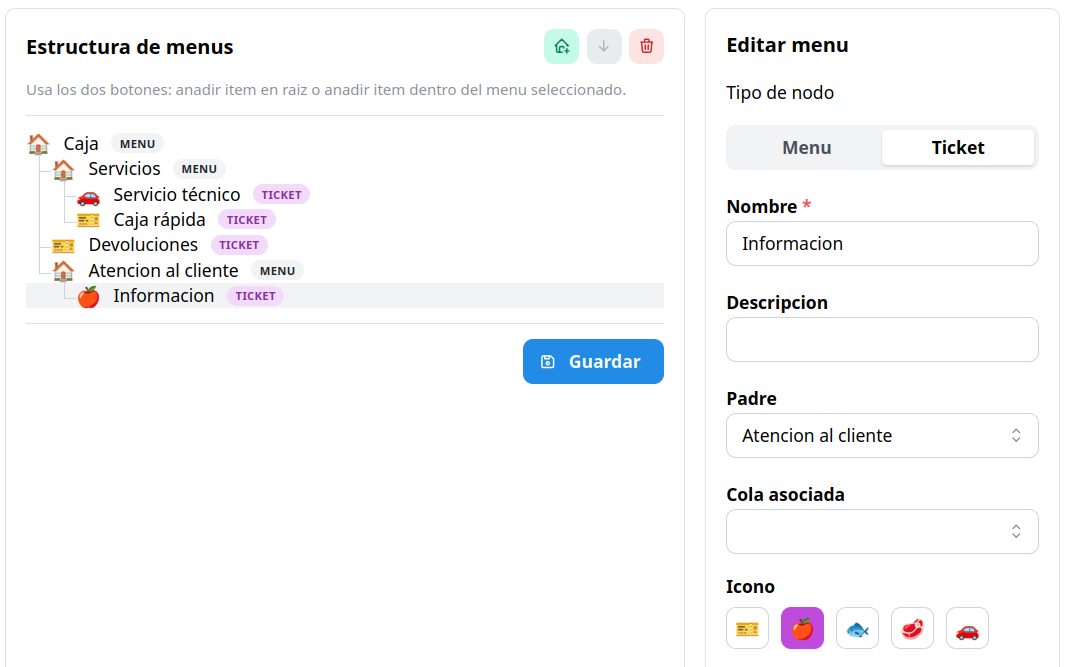
Node types
Section titled “Node types”When creating a node you choose one of these two types:
Menu node
Section titled “Menu node”A container that groups submenus or other options. It has:
| Field | Description |
|---|---|
| Name | What will be shown on the ticket screen. |
| Description | (Optional) Free text with more context. |
The menu icon is fixed and cannot be chosen.
Ticket node
Section titled “Ticket node”The final option: pressing it prints the ticket with your turn. It has:
| Field | Description |
|---|---|
| Name | What will be shown on the ticket screen. |
| Internal description | So the administrator knows what it is. |
| Icon | To tell the option apart visually. |
| Associated queue | The queue the turn is taken from. |